

AI is transforming software development. Beyond generating code and boosting productivity, AI can now be embedded in products, letting applications interpret context, generate responses, recommend actions, and interact through intelligent agents.
For Java developers, this presents a new integration challenge: how can we add these capabilities to enterprise applications without needless complexity or heavy abstractions?
In this tutorial, we will build an enterprise Java integration using OmniHai, a lightweight API for connecting Java applications with AI models and providers. By combining OmniHai with Jakarta EE, we can add AI capabilities while continuing a familiar, composable, and maintainable architecture.
Java is well positioned for AI. The next step is to put this into practice.
We will build a REST API that accepts a book title and uses an LLM to recommend three related books. This simple example lets us focus on OmniHai's core concepts and its integration with Jakarta EE, without adding extra infrastructure or domain complexity.
Creating the initial Project
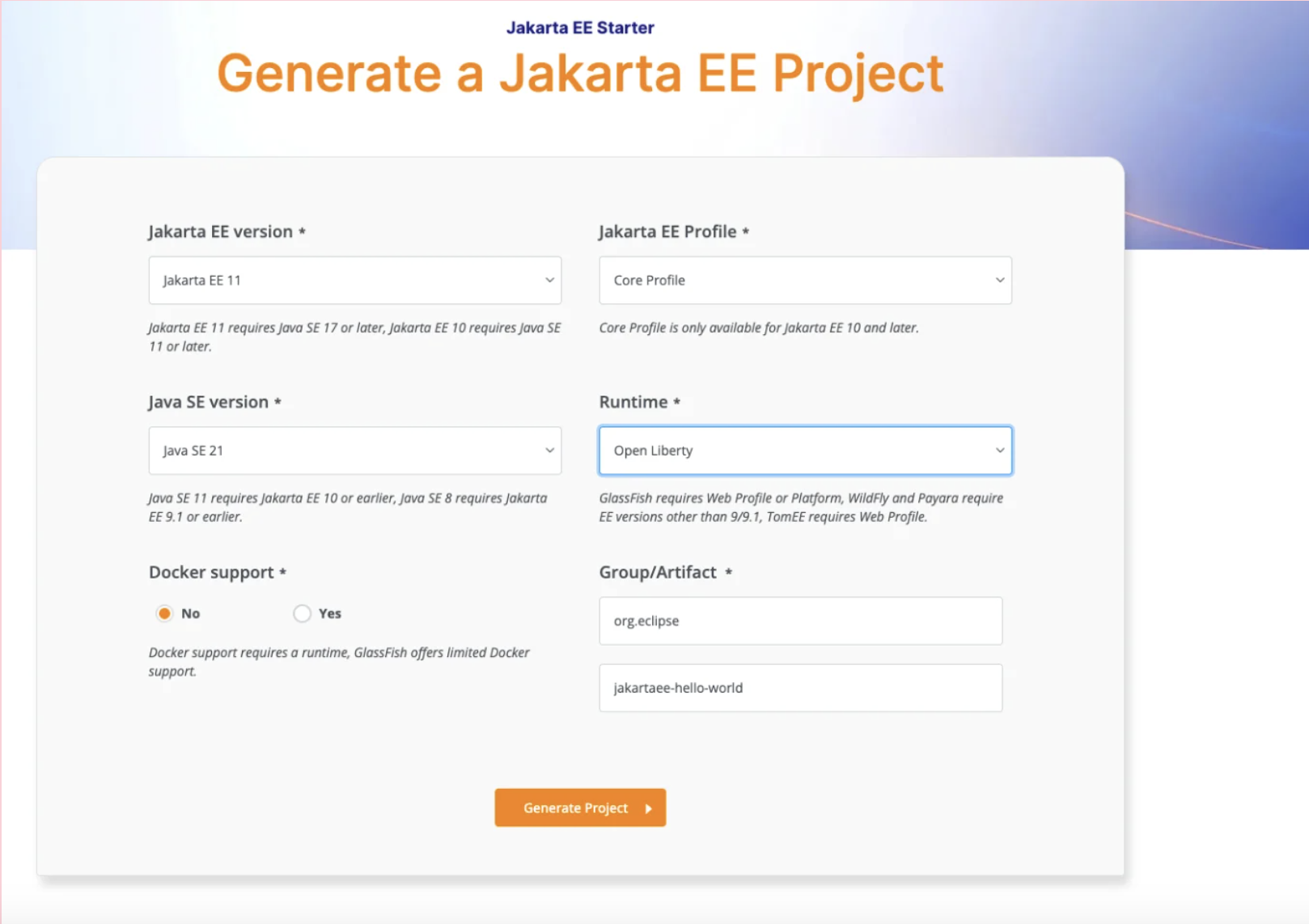
Begin by creating the Jakarta EE project structure. The Jakarta EE Starter tool streamlines this process and saves time.
For this tutorial, select the following options:
- Jakarta EE version: Jakarta EE 11
- Profile: Core Profile
- Java version: Java 21
- Runtime: Open Liberty
Next, select the Group and Artifact names for your application, then download the generated project.
Once the Jakarta EE structure is set up, you can add OmniHai and begin developing the AI integration.
After downloading the project, add the OmniHai support to the pom.xml.
<dependency>
     <groupId>org.omnifaces</groupId>
     <artifactId>omnihai</artifactId>
     <version>${omnihai.version}</version>
 </dependency>
OmniHai offers a lightweight abstraction between applications and AI model providers. Rather than tying application code to a specific provider SDK, it provides a unified API, enabling Java applications to interact with various AI models using a consistent approach.
In this tutorial, we use OpenAI as the model provider. The application focuses on required AI capabilities, not provider-specific details. This separation simplifies replacing or updating the provider without embedding provider-specific code throughout the application.
Before running the application, provide your OpenAI API key as an environment variable:
export OPENAI_API_KEY="your-api-key"This keeps the credential outside the source code and allows OmniHai to access it at runtime without adding provider-specific configuration to the application.
Creating REST Resources
With the basic project structure in place, the next step is to develop the REST application.
In this example, we will provide an API that accepts a book and returns up to three recommended books that logically follow it.
Start defining the data structures. Because these classes are simple, immutable data carriers, Java records suit this purpose well.
import java.util.List;

public record Book(
       String title,
       String author,
       String description,
       List<String> keywords
) {
}
Each recommendation includes the suggested book and a brief explanation of its relevance.
public record Recommendation(
       Book book,
       String reason
) {
}
The service returns a collection of recommendations:
import java.util.List;

public record NextReadBooks(
       List<Recommendation> recommendations
) {
}
The request includes the book that serves as the starting point for recommendations:
public record BookRequest(
       String title,
       String author
) {
}
With the domain structure complete, the next step is to connect Java to the LLM.
OmniHai offers lightweight CDI integration via AIService. Rather than implementing a framework-defined AI service, inject and configure its behavior using the @AI annotation and Jakarta Expression Language.
The tutorial demonstrates how to create NextReadBookService as a standard CDI bean:
package org.soujava.demo.jakarta.hello;

import jakarta.enterprise.context.ApplicationScoped;
import jakarta.inject.Inject;

import org.omnifaces.ai.AIService;
import org.omnifaces.ai.cdi.AI;

@ApplicationScoped
public class NextReadBookService {

   @Inject
   @AI(
       apiKey = "${config:openai.api-key}",
       model = "${config:openai.model}",
       prompt = """
           Recommend up to 3 books that should naturally follow the provided book in a learning journey.

           Recommendations should prioritize:
           - conceptual progression
           - complementary knowledge
           - technical depth
           - thematic similarity

           For each recommendation provide:
           - title
           - author
           - concise description
           - relevant keywords
           - a short recommendation reason

           Keep recommendations concise, technically relevant, and focused on software engineering
           and architecture learning.
           """
   )
   private AIService aiService;

   public NextReadBooks recommend(BookRequest request) {
       var prompt = """
           Recommend the next books for this learning journey:
           Title: %s
           Author: %s
           """.formatted(request.title(), request.author());

       return aiService.chat(prompt, NextReadBooks.class);
   }
}
The @AI annotation configures the injected AIService by specifying the API key, model, and system-level prompt that guide the model’s behavior.
The recommend method generates a prompt customized to the provided book title and author:
var prompt = """
   Recommend the next books for this learning journey:
   Title: %s
   Author: %s
   """.formatted(request.title(), request.author());
The model interaction is completed with a single call:
return aiService.chat(prompt, NextReadBooks.class);
The second argument specifies the expected response type. OmniHai sends the prompt to the configured model and maps the response directly to NextReadBooks.
This approach eases integration: CDI manages the service lifecycle, @AI defines model configuration and behavior, and AIService handles communication with the AI provider.
The final step is to make our AI service available through a REST endpoint.
Since NextReadBookService is registered as a CDI bean, we can inject it into a Jakarta REST resource and delegate recommendation requests to OmniHai.
import jakarta.enterprise.context.ApplicationScoped;
import jakarta.inject.Inject;
import jakarta.ws.rs.Consumes;
import jakarta.ws.rs.POST;
import jakarta.ws.rs.Path;
import jakarta.ws.rs.Produces;
import jakarta.ws.rs.core.MediaType;

@ApplicationScoped
@Path("books")
@Produces(MediaType.APPLICATION_JSON)
@Consumes(MediaType.APPLICATION_JSON)
public class BookResource {

   @Inject
   private NextReadBookService nextReadBookService;

   @POST
   public NextReadBooks recommend(BookRequest request) {
       return nextReadBookService.recommend(request);
   }
}
The application code is minimal. Jakarta REST manages the HTTP layer, CDI injects the AI service, and OmniHai communicates with the configured model and converts responses into Java records.
You can now build and start the application using Open Liberty:
mvn clean package liberty:run
After the application starts, call the endpoint with a known book:
curl --location 'http://localhost:9080/rest/books' \
 --header 'Content-Type: application/json' \
 --data '{
   "title": "Domain-Driven Design with Java: Building Scalable and Maintainable Java Applications with DDD Principles",
   "author": "Otávio Santana"
 }'
The request is received by the Jakarta REST endpoint and delegated to NextReadBookService. OmniHai sends the request to the configured LLM and maps the result to NextReadBooks.
The response includes up to three books, each with its title, author, description, keywords, and an explanation of why it is a suitable next step in the learning journey.
With just a REST resource, a declarative Java interface, and minimal configuration, you now have an enterprise Java application that interacts with an LLM while keeping the AI provider separate from the application logic.
Conclusion
Integrating AI into enterprise Java does not require changes to the application architecture or the use of complex abstractions. By combining Jakarta EE with OmniHai, developers can maintain common patterns such as Jakarta REST, CDI, and Java records, while including AI capabilities through a lightweight, provider-neutral API. OmniHai manages interactions with the underlying model and maps structured responses to standard Java types, making AI a composable application capability rather than a separate architectural concern.
References:
- Source code: https://github.com/soujava/hell-world-omnihai-jakarta-ee
- omnihai: https://omnihai.org/
About the Author

Otavio Santana
Otavio is an award-winning Software Architect, Technology Strategist, and Open Source Leader. He is a Java Champion, Oracle ACE Director, recipient of the Eclipse Top Committer Award, and winner of multiple JCP Awards, including the Duke's Choice Award. Since Java 8, he has helped shape the Java ecosystem as a Jakarta EE Specification Leader and member of the JCP Executive Committee, contributing to the evolution of enterprise software standards and open-source technologies. Otavio is dedicated to empowering organisations and engineers through technology strategy, software architecture, and open-source best practices. He combines industry leadership with practical experience in building scalable systems. Outside of technology, he enjoys history, economics, travel, and languages, and is known for his sense of humour.